0. 개요
이번 챕터의 내용은 분석법에 집중하기보단, 서비스 운영 과정에서 일반적으로 활용되는 고객 분석법들을 나열하여, 필요 상황에 맞게 활용하도록 구성한 듯 합니다.
따라서, 이 포스팅에는 액션별 집계, 로그인/비로그인 유저 집계, 회원/비회원 유저 집계 , 연령/성별 별 유저 집계, 카테고리/연령, 방문빈도 집계, 벤다이어그램, Decile 분석, RFM, 지속률/정착률, 잔존률(리텐션) 까지만 진행하고 이후 포스팅에서는 MAU 부터 LTV 계산까지 다뤄보는 것으로 목표를 잡았습니다.
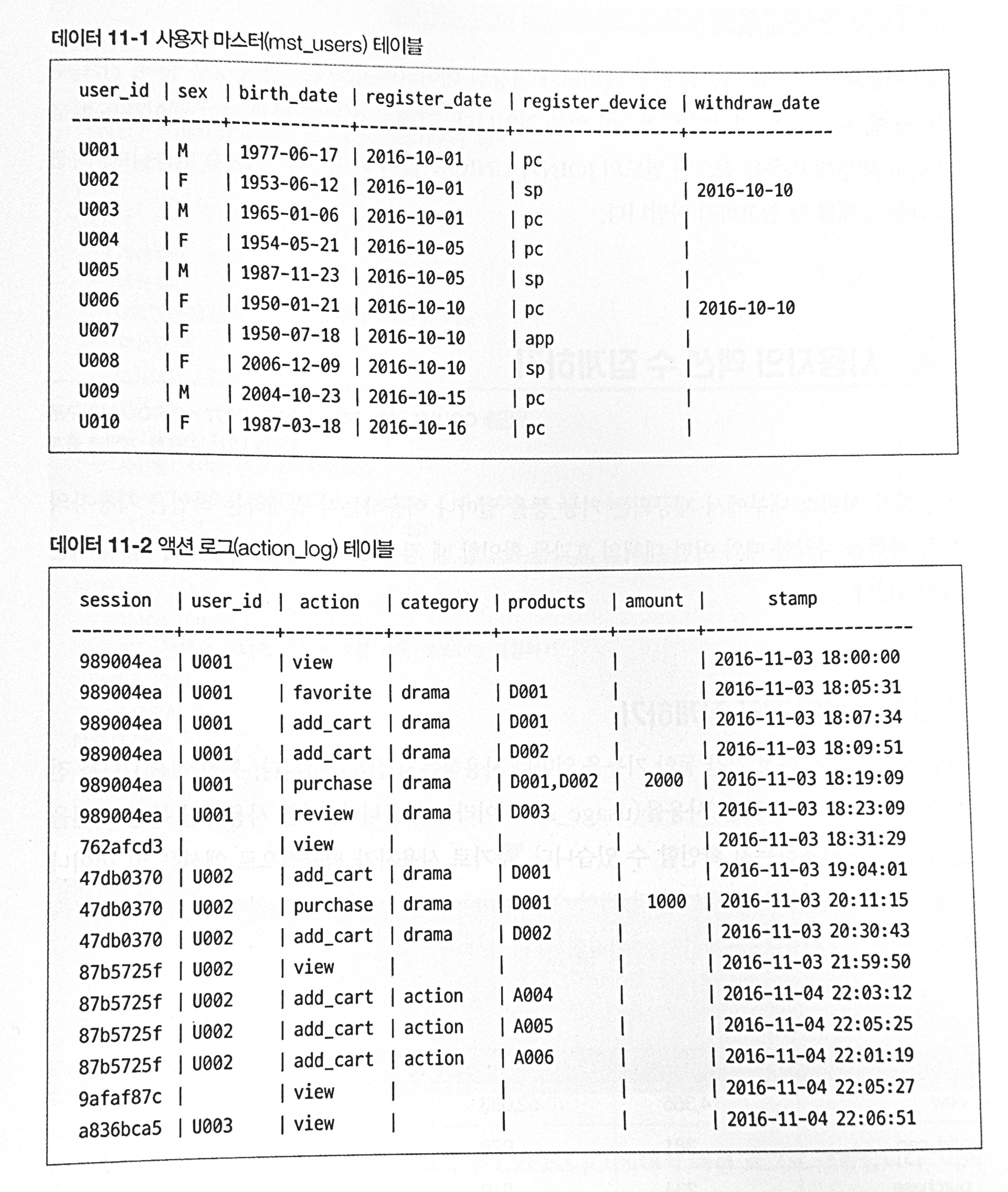
데이터셋은 아래와 같이, 사용자 마스터 테이블, 액션 테이블로 구성되어 있고 특징은 다음과 같습니다.
(1) 탈퇴 회원의 경우, 마스터 테이블의 withdraw_date에 탈퇴 날짜를 표기한다.
(2) 액션은 모두 액션 로그 테이블에 저장되며, 액션의 종류로, view, favorite, add_cart, purchase, review 등이 있다.
(3) 액션 로그에 user_id가 기입된 유저는 로그인 유저, 공백인 유저는 비로그인 유저이다.
(즉 서비스 내에서 비로그인 고객의 액션을 허용한다.)
1. 액션별 집계 , 로그인/비로그인 집계, 회원/비회원 집계
(1) 액션별 집계
설명하기 앞서 세션에 대해 먼저 알아보겠습니다. 세션은 쉽게 말하면 개별 유저의 접속마다 유지되고 있는 서비스 페이지 창으로 생각할 수 있습니다. 즉 한 유저가 페이지 내에서 어려 액션을 취한다고 했을 때 진입, view, add_cart, purchase 하는 모든 상황이 한 페이지 내에서 이루어진다면 이는 하나의 독립된 세션에 기록됩니다. (액션 로그 테이블을 참고하자)
(물론 내 지식으로 쓴 내용이라 틀릴 수도 있다.)
또한, Unique User(UU) 에 대해서도 알아보면, 우리가 원하는 특정 행동을 한 개별 유저의 수를 의미합니다.
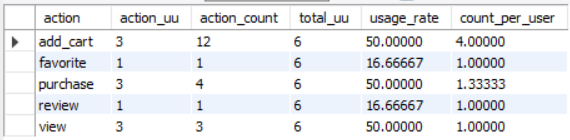
즉, 아래의 쿼리에서 total_UU 의 경우에는 서비스를 이용한 개별 유저의 총 수를, action_UU 는 그 중에서 특정 action을 취했던 개별 유저의 수를, usage late는 전체 유저 중 특정 action을 취한 사용자의 비율, count_per_user 특정 action을 한 유저들이 각각 평균 몇 번의 action을 취했는지를 계산한 것입니다.
(+) status 없이 단순 select문으로도 액션 집계가 가능하나, 저자는 계산 비용 때문인지 개별 고객의 특정 행동 여부를 total_uu 서브쿼리를 통해 집계한 이후 활용하였다.
(+) 집계 쿼리에 status 테이블이 횔용되었다면, group by에도 관련 조건이 걸려있어야 한다. (group by s.total_uu 빠지면 에러남)
with
status as (
	select count(distinct session) as total_uu from action_log
)
select
	l.action,
	-- 액션 UU(unique user)
	count(distinct l.session) as action_uu,
	-- 액션 발생 수
	count(1) as action_count,
	-- 전체 UU
	s.total_uu,
	-- 사용률 : <맥션  UU> / <전체 UU>
	100.0 * count(distinct l.session) / s.total_uu as usage_rate,
	-- 1인당 액션 수 : <액션 수> / <액션 UU>
	1.0 * count(1) / count(distinct l.session) as count_per_user
from
	action_log as l
	cross join
	status as s
group by
	l.action, s.total_uu
;
(2) 로그인/비로그인 유저 집계
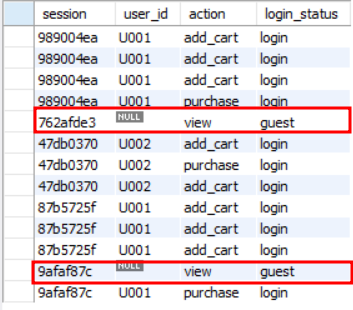
다음으로, 로그인 비로그인 유저 집계를 위해 두가지 사항을 고려하였다. 먼저, 액션 로그를 기반으로, 로그인 후 액션을 취한 유저에게는 'login' 이라는 상태를, 로그인 없이 액션을 취한 유저에게는 'guest'를 부여하였다. 이는 간단한 case 구문을 활용하여 계산 가능하다.
(+) COALESCE 함수는 주어진 인수 목록에서 첫 번째로 NULL이 아닌 값을 반환한다. 즉 coalesce(user_id, '') 와 같이 들어갔을 때, user_id 값에 null 값이 나타난다면 이를 건너뛰고 ''(공백문자열) 을 반환하게 된다.
with
action_log_with_status as (
	select
		session,
		user_id,
		action,
		-- user_id 가 공백인지를 기준으로 Login/Guset 판별
		case when coalesce(user_id, '') <> '' then 'login' else 'guest' end as login_status
	from
		action_log
)
select * from action_log_with_status;
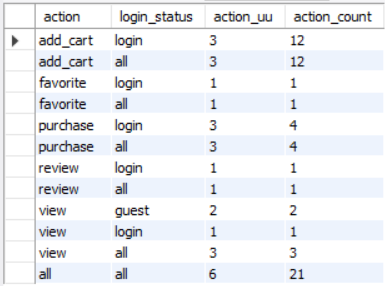
다음은 로그인 상태에 따라 액션 수를 따로 집계하는 쿼리이다. 이는 로그인/비로그인 유저에 대한 액션 비교를 가능하게 해준다. 구현은 GROUP BY, ROLLUP 에 의해 이루어지며, 누적 컬럼의 NULL 값 대신 'all' 이 들어가도록 COALESCE 함수를 사용하였다.
with
action_log_with_status as (
	select
		session,
		user_id,
		action,
		-- user_id 가 공백인지를 기준으로 Login/Guset 판별
		case when coalesce(user_id, '') <> '' then 'login' else 'guest' end as login_status
	from
		action_log
)
select
	coalesce(action, 'all') as action,
	coalesce(login_status, 'all') as login_status,
	count(distinct session) as action_uu,
	count(1) as action_count
from
	action_log_with_status
group by
	action, login_status with rollup
;
(3) 회원/비회원 유저 집계
마지막으로 회원/비회원 유저 집계는, 동일 세션일 때 한번이라도 로그인 기록이 남아있다면 회원, 로그인 기록이 없는 세션의 유저의 경우에는 비회원으로 가정하여 각 로그에 member_status 컬럼을 붙인 쿼리입니다.
예제 데이터가 책과는 달라 주어진 데이터 내에선 의미가 없지만, MAX 함수를 활용하여, 과거 로그인 기록을 검색해 채워넣는 방식이 활용 가능성이 높아보여 쿼리문만 재현해보았습니다.
(+) max 는 일반적으로 group by로 묶인 파티션 중 가장 큰 값을 출력하는 함수이지만, 아래와 같이 null 값이 아닌 user_id 기록이 존재하는 경우 이 값을 그대로 가져오는 목적으로도 사용 가능하다.
with
action_log_with_status as (
	select
		session,
		user_id,
		action,
		-- 타임스탬프 기준 정렬 이후, 과거 로그인 기록이 있는 유저라면 member로 등록
		case
			when
				coalesce(max(user_id)
					over(partition by session order by stamp
						rows between unbounded preceding and current row), '') <> ''
				then 'member'
			else 'none'
		end as member_status,
		stamp
	from
		action_log
)
select * from action_log_with_status ;
2. 성별/연령별 집계
간단하게만 보면, 성별/연령별 집계는 코드로서는 구간화정도의 의미를 갖지만, 성별/연령별 계층을 구분하여 각 계층의 소비성향 등과 연계하여 활용할 수 있는 분류방식이므로 간단하게 두가지 예시 정도만 추려서 따라해보려 합니다.
(1) 성별/연령별 구분 규칙에 따른 집계
만약 도메인 영역에서 아래와 같이 고객 연령/성별 별 분류를 진행하여 분석하고싶다고 가정하자. 이때, 나이는 집계 년도에 따라 유동적으로 바뀔 수 있으므로, 일반적으로 나이가 아닌 생년월일만을 DB에 기록해 두는 경우가 많은 듯 합니다.
따라서 먼저 개별 고객의 나이(Age)를 계산하는 컬럼을 서브쿼리로 생성한 이후, 구간화를 통해 성별/연령별 카테고리를 분류할 수 있습니다.
| 연령/성별 구분 | 성별 |
| C | 4-12 남/여성 |
| T | 13-19 남/여성 |
| M1 | 20-34 남성 |
| M2 | 35-49 남성 |
| M3 | 50세 이상 남성 |
| F1 | 20-34 여성 |
| F2 | 35-49 여성 |
| F3 | 50세 이상 여성 |
카테고리 구현은 성별/연령 구간을 case 문으로 구분한 이후 이 두 구간 분류값을 concat 함수로 붙여서 category 태그로 활용한다. 기준 날짜는 24년 6월 21일로 두었고, 성별, 나이 기준으로 내림차순 정렬하였다.

with
-- 기준 날짜 입력, 나이 계산 편의를 위해 int로 변환 (여기서는 unsigned 로 변환했음)
mst_users_with_int_birth_date as (
	select
		* ,
		20140621 as int_specific_date,
		cast(replace(substring(birth_date, 1, 10), '-', '') as unsigned) as int_birth_date
	from
		mst_users
),
-- 기준 날짜와 생년월일 차이를 통해 만나이 계산
mst_users_with_age as (
	select
		* ,
		floor((int_specific_date - int_birth_date) / 10000) as age
	from
		mst_users_with_int_birth_date
),
-- 성별/연령을 통한 구간화
mst_users_with_category as (
	select
		user_id,
		sex,
		age,
		birth_date,
		concat(
			case
				when 20 <= age then sex
				else ''
			end,
			case
				when age between 4 and 12 then 'C'
				when age between 13 and 19 then 'T'
 				when age between 20 and 34 then '1'
 				when age between 35 and 49 then '2'
				when age >= 50 then '3'
			end
		) as category
	from
		mst_users_with_age
	order by
		sex, age
)
select * from mst_users_with_category ;
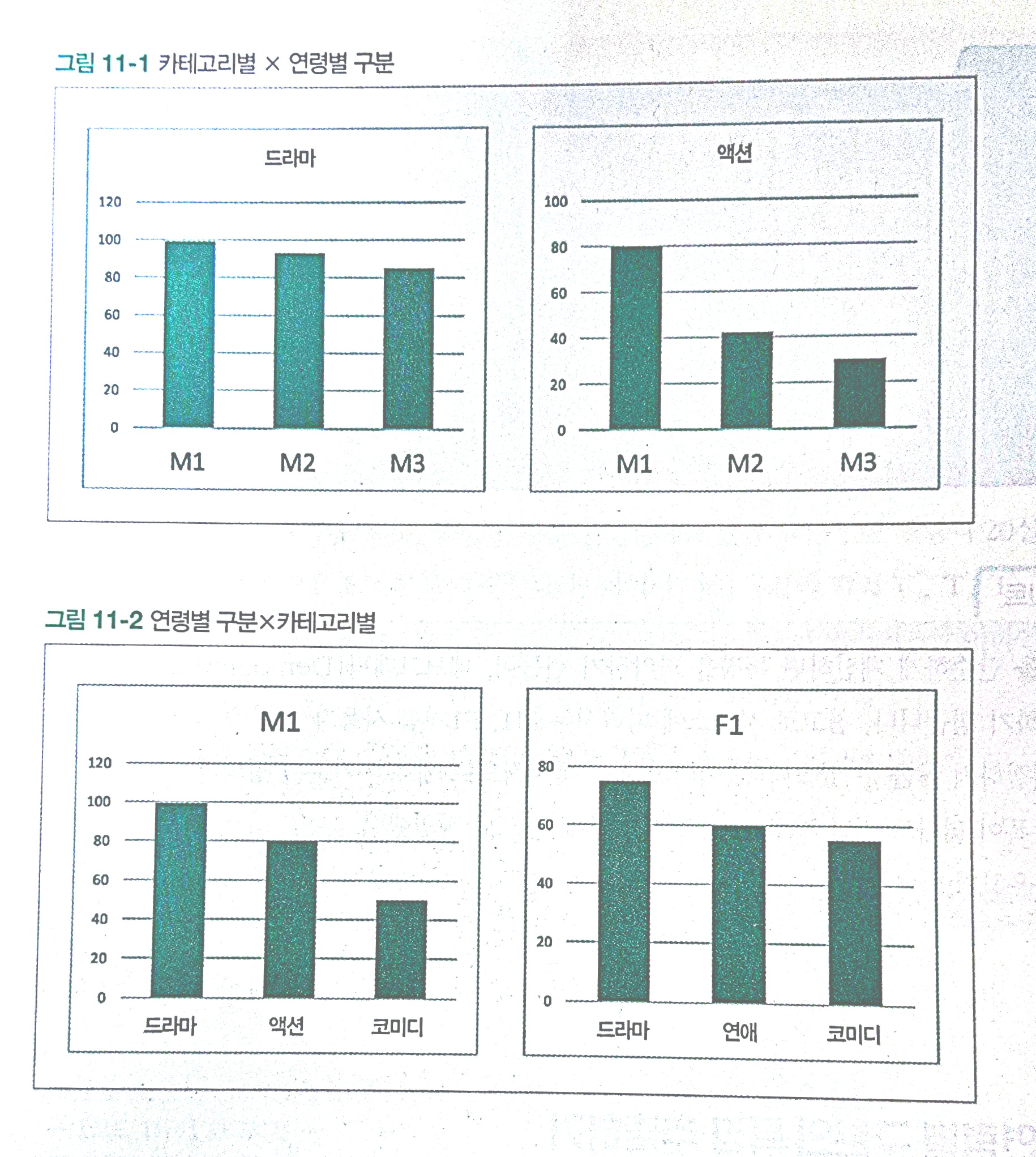
(3) 성별/연령별 X 카테고리 분류 집계
마지막으로, 성별/연령 태그를 카테고리별로 구분하여 집계하는 쿼리를 작성해 볼 수 있다. 이는 아래와 같이 바로 쿼리로 뽑은 데이터를 바탕으로 시각화까지 간단하게 실행해 볼 수 있다는 점에서 효율적인 쿼리이다.
with
-- 기준 날짜 입력, 나이 계산 편의를 위해 int로 변환 (여기서는 unsigned 로 변환했음)
mst_users_with_int_birth_date as (
	select
		* ,
		20140621 as int_specific_date,
		cast(replace(substring(birth_date, 1, 10), '-', '') as unsigned) as int_birth_date
	from
		mst_users
),
-- 기준 날짜와 생년월일 차이를 통해 만나이 계산
mst_users_with_age as (
	select
		* ,
		floor((int_specific_date - int_birth_date) / 10000) as age
	from
		mst_users_with_int_birth_date
),
-- 성별/연령을 통한 구간화
mst_users_with_category as (
	select
		user_id,
		sex,
		age,
		birth_date,
		concat(
			case
				when 20 <= age then sex
				else ''
			end,
			case
				when age between 4 and 12 then 'C'
				when age between 13 and 19 then 'T'
 				when age between 20 and 34 then '1'
 				when age between 35 and 49 then '2'
				when age >= 50 then '3'
			end
		) as category
	from
		mst_users_with_age
	order by
		sex, age
)
select
	p.category as product_category,
	u.category as user_category,
	count(*) as purchase_count
from
	action_log as p
	join
		mst_users_with_category as u
	on p.user_id = u.user_id
where
	-- 편의상 구매 로그만 선택
	action = 'purchase'
group by
	p.category, u.category
order by
	p.category, u.category
;
3. 밴 다이어 그램 집계
서비스 내부에서 여러 기능을 제공하더라도, 실제 고객들이 그 기능을 전부 사용하지는 않습니다. 이때 아래와 같이 벤다이어그램으로 집계한다면 얼마나 많은 고객들이 개별 기능들을 실제 활용하고 있는지 확인할 수 있습니다.

(1) 유저 중심의 액션 플래그 탐색
먼저 개별 사용자별로 어떤 기능의 액션을 사용한 적이 있는지를 알아보겠습니다. 다만, 실제 해당 액션을 취한 경험이 있는지를 파악하는 것이 목적이므로, sign() 함수를 통해 해당 액션을 취한 경우 1, 아닌 경우를 0으로 두도록 하겠습니다.
다만, 책에서의 예제보다, 실제 제공된 데이터는 훨씬 작아 쿼리 출력 결과가 몇 열이 나오지 않는건 감안해주셨으면 합니다.

with
user_action_flag as (
	-- 액션을 했으면 1, 아니면 0
	select
		user_id,
		sign(sum(case when action = 'purchase' then 1 else 0 end)) as has_purchase,
		sign(sum(case when action = 'review' then 1 else 0 end)) as has_review,
		sign(sum(case when action = 'favorit' then 1 else 0 end)) as has_favorite
	from
		action_log
	group by
		user_id
)
select * from user_action_flag ;
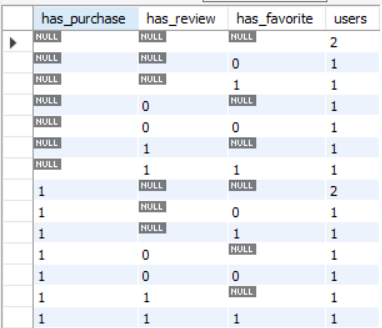
(2) 모든 액션 조합에 대한 집계
이젠 모든 액션 경우의수에 대해서 각 벤다이어그램에 포함된 유저 수를 계산하는 쿼리를 작성해 보겠습니다. 타 SQL 문에서는 CUBE 문을 활용하면 되지만, My SQL 문에서는 cube 를 지원하지 않습니다. 이를 지원하지 않는 SQL 문을 위해 직접 모든 조합의 누계를 계산하는 방식이 있어 따라해 봤습니다.
그러나, 모든 조합에 대한 select 문을 작성하며, 이를 union all 로 합치는 과정에서 굉장히 비효율적일 것이라는 생각이 든다.
with user_action_flag as (
	-- 액션을 했으면 1, 아니면 0
	select user_id,
			sign(sum(case when action = 'purchase' then 1 else 0 end)) as has_purchase,
			sign(sum(case when action = 'review' then 1 else 0 end)) as has_review,
			sign(sum(case when action = 'favorite' then 1 else 0 end)) as has_favorite
	from action_log
	group by user_id
),
user_action_cube as (
	-- 3개 조합에 대한 집계
	select has_purchase, has_review, has_favorite, count(*) as users
	from user_action_flag
	group by has_purchase, has_review, has_favorite

	-- 2개 조합에 대한 집계
	union all
	select has_purchase, has_review, null as has_favorite, count(*) as users
	from user_action_flag
	group by has_purchase, has_review

	union all
	select has_purchase, null as has_review, has_favorite, count(*) as users
	from user_action_flag
	group by has_purchase, has_favorite

	union all
	select null as has_purchase, has_review, has_favorite, count(*) as users
	from user_action_flag
	group by has_review, has_favorite

	-- 1개 조합에 대한 집계
	union all
	select has_purchase, null as has_review, null as has_favorite, count(*) as users
	from user_action_flag
	group by has_purchase

	union all
	select null as has_purchase, has_review, null as has_favorite, count(*) as users
	from user_action_flag
	group by has_review

	union all
	select null as has_purchase, null as has_review, has_favorite, count(*) as users
	from user_action_flag
	group by has_favorite

	-- 모두 Null 일 때 집계
	union all
	select null as has_purchase, null as has_review, null as has_favorite, count(*) as users
	from user_action_flag
)
select has_purchase, has_review, has_favorite, users
from user_action_cube
order by has_purchase, has_review, has_favorite;
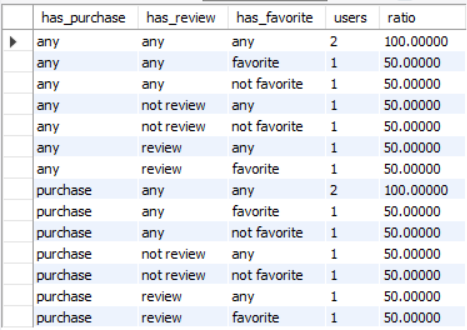
(3) 모든 액션 조합에 대한 집계 (각 벤다이어그램 비율 계산)
다음으로는, 각 벤다이어그램에 들어갈 액션 조합별 유저 집계를 비율로 계산해 보겠습니다. 이를 통해, 전체의 몇 %의 유저가 해댱 기능의 조합을 사용하고 있는지 살펴볼 수 있을 것입니다. 참고로 any는 '해당 기능을 사용했거나 사용하지 않은, 즉 해당 컬럼의 누적값' 임을 알립니다.
참고로, 가지고있는 고객 컬럼이 단 2건이라, 기능이 수행됐구나 정도만 봐주시면 감사하겠습니다.
WITH user_action_flag AS (
    [이전 코드와 동일]
),
user_action_cube AS (
	[이전 코드와 동일]
)
SELECT
	-- 0,1 플래그 대신, 보기 편하게 문자열로 가공
	case has_purchase
		when 1 then 'purchase' when 0 then 'not purchase' else 'any'
	end as has_purchase,
	case has_review
		when 1 then 'review' when 0 then 'not review' else 'any'
	end as has_review,
	case has_favorite
		when 1 then 'favorite' when 0 then 'not favorite' else 'any'
	end as has_favorite,
	users,
	-- 포함 비중 계산
	100.0 * users /
	nullif(sum(case when has_purchase is null
					and has_review is null
					and has_favorite is null
					then users else 0 end) over()
	,0)
	as ratio
from
	user_action_cube
order by
	has_purchase, has_review, has_favorite
;
4. Declie (10분위수) 활용 사용자 그룹 나누기
이번에는 사용자의 구매 순위에 따라 10분위수로 구분하고 그룹을 할당하고 그 구성비까지 계산해 보겠습니다. 여전히 두 user 데이터밖에 없어 코드만 참고바랍니다.

with
user_purchase_amount as (
	select
		user_id,
		sum(amount) as purchase_amount
	from
		action_log
	where
		action = 'purchase'
	group by
		user_id
),
user_with_decile as(
	select
		user_id,
		purchase_amount,
		ntile(10) over (order by purchase_amount Desc) as decile
	from
		user_purchase_amount
),
decile_with_purchase_amount as (
	select
		decile,
		sum(purchase_amount) as amount,
		avg(purchase_amount) as avg_amount,
		sum(sum(purchase_amount)) over (order by decile) as cumulative_amount,
		sum(sum(purchase_amount)) over () as total_amount
	from
		user_with_decile
	group by
		decile
)
select
	decile,
	amount,
	avg_amount,
	100.0 * amount / total_amount as total_ratio,
	100.0 * cumulative_amount / total_amount as cumulative_ratio
from
	decile_with_purchase_amount;
5. RFM 분석으로 사용자 나누기
이번에는 소비액 기준 우수 고객을 decile 처럼 10가지로 나눌 뿐 아니라, 최근 구매일, 구매 횟수까지 고려하는 RFM 분석을 적용해 보겠습니다,
- R : Recency - 최근 구매일
- F : Frequency - 사용자가 구매한 횟수
- M : Monetary - 구매 금액 합게
RFM을 활용하면 기존에 많은 구매를 했던 유저라도, 현재는 서비스 휴먼으로 돌입하지는 않았는지, 장기적으로 저가 물품을 여러번 구매한 고객은 아닌지와 같은 고객 분류를 쉽게 할 수 있도록 도와줍니다.

with
purchase_log as (
	select
		user_id,
		amount,
		-- 타임스탬프 기반 날짜 추출
		substring(stamp, 1, 10) as dt
	from
		action_log
	where
		action = 'purchase'
),
user_rfm as (
	select
		user_id,
		max(dt) as recent_date,
		DATEDIFF(CURRENT_DATE(), MAX(STR_TO_DATE(dt, '%Y-%m-%d'))) AS recency,
		count(dt) as frequency,
		sum(amount) as monetary
	from
		purchase_log
	group by
		user_id
)
select * from user_rfm ;'My SQL' 카테고리의 다른 글
| [MySQL] 데이터 분석을 위한 SQL 레시피 - part4 시계열분석 (1) | 2024.06.19 |
|---|---|
| [데이터 분석을 위한 SQL 레시피] 데이터 분석 목적과 분석 방향 정리 (1) | 2024.06.18 |
| My SQL "데이터 분석을 위한 SQL 레시피" - part3 테이블 구조 변경, 다중 테이블 조작 (0) | 2024.03.22 |
| My SQL "데이터 분석을 위한 SQL 레시피" - part2 연산 및 그룹화 (0) | 2024.03.11 |
| MySQL "데이터 분석을 위한 SQL 레시피" - part1 값 조작하기 (0) | 2024.02.27 |